> ## Documentation Index
> Fetch the complete documentation index at: https://docs.kovrex.ai/llms.txt
> Use this file to discover all available pages before exploring further.
# Calling Agents
> Request format, responses, and best practices
All agent calls go through the Kovrex gateway at `gateway.kovrex.ai`.
## Get an API key
1. Go to: `https://www.kovrex.ai/dashboard/api-keys`
2. Click **Create API Key**
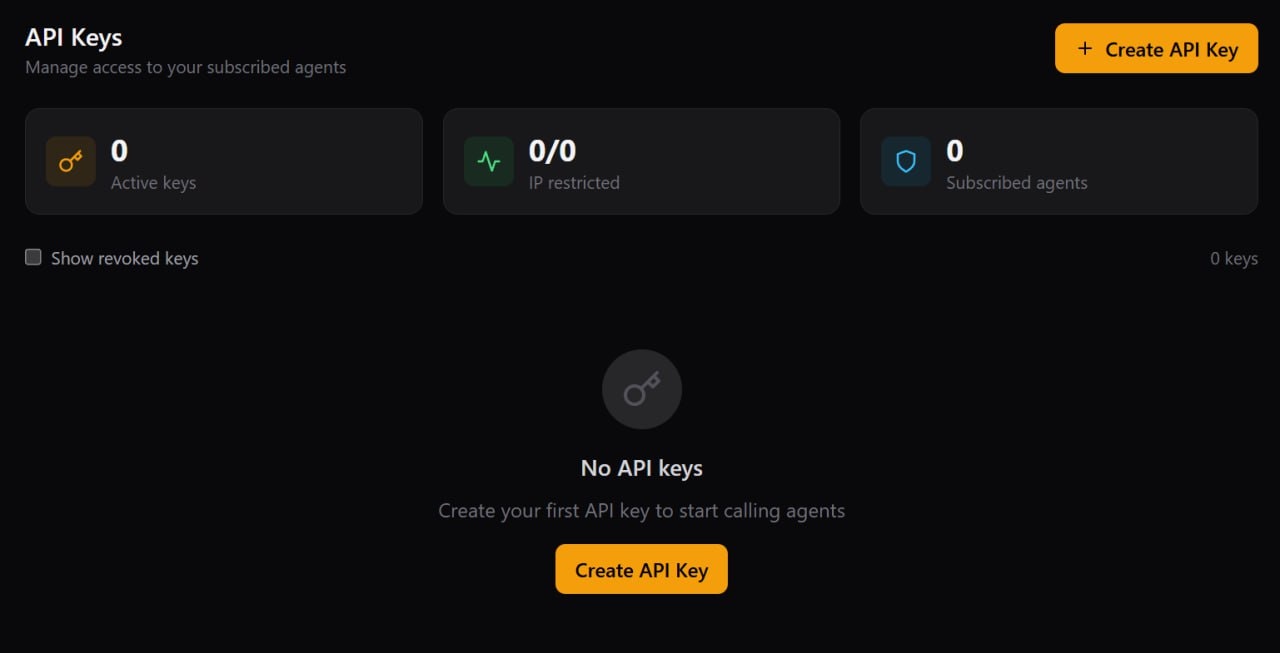 3. Fill in a name, select **Live** vs **Test** key type, optionally scope the key to a specific agent, then click **Create Key**
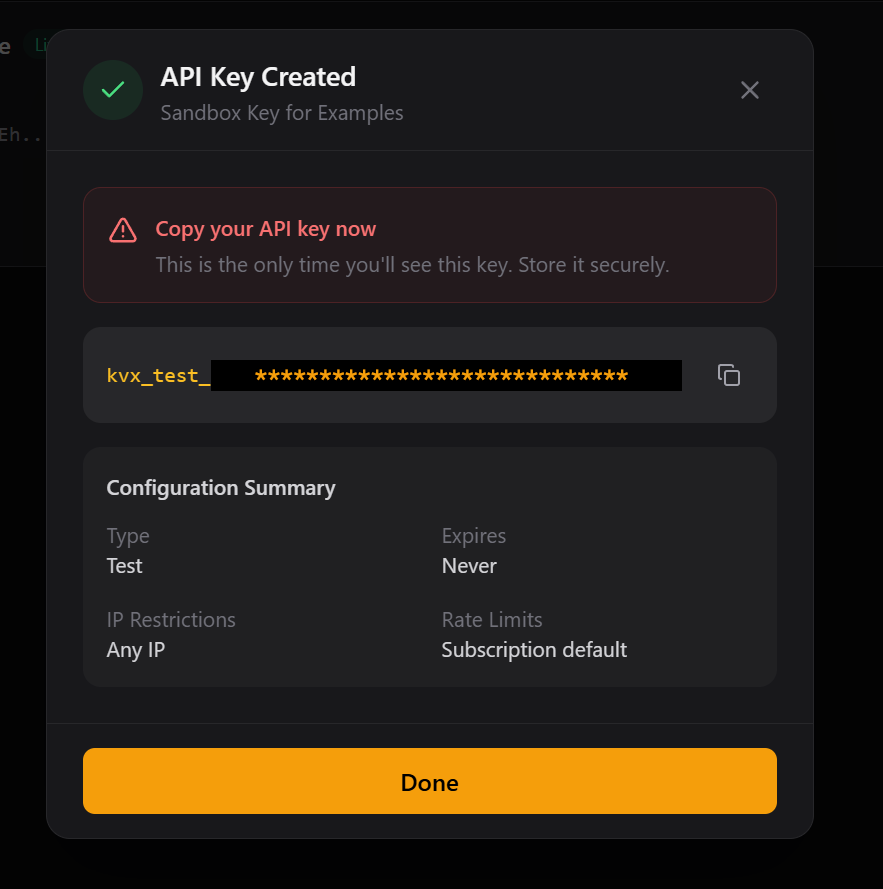
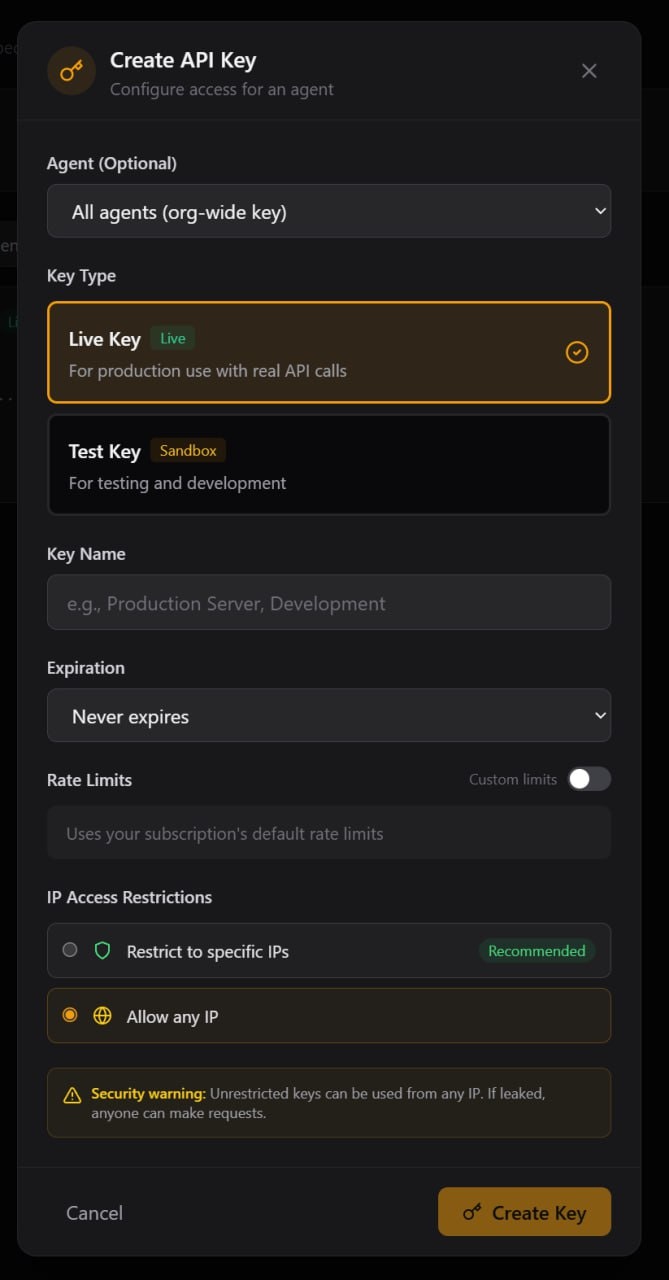 4. Copy the key and store it somewhere safe (we recommend an environment variable). This is the only time you’ll see the full key.
 ## Subscribe to an agent
Before you can call an agent, you need to subscribe to it in the marketplace.
1. Go to the **Agent Marketplace** in your dashboard
2. Find **News Salience Filter** (a free test agent)
3. Click **Subscribe**
## Subscribe to an agent
Before you can call an agent, you need to subscribe to it in the marketplace.
1. Go to the **Agent Marketplace** in your dashboard
2. Find **News Salience Filter** (a free test agent)
3. Click **Subscribe**
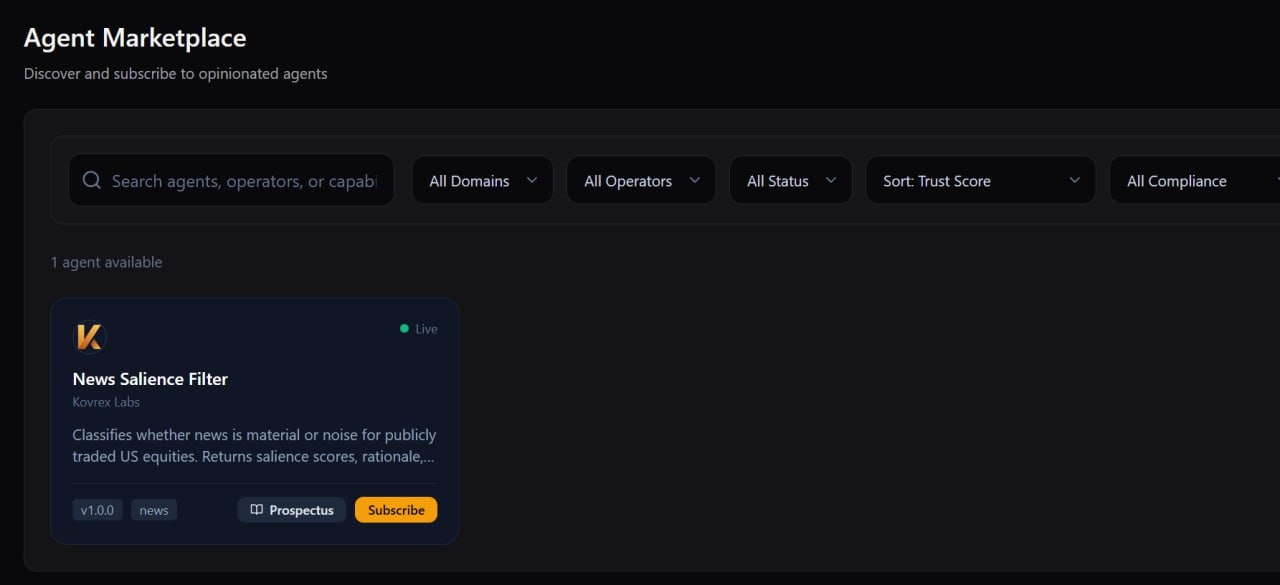 4. Confirm the **Starter / Free** plan, then click **Subscribe** again
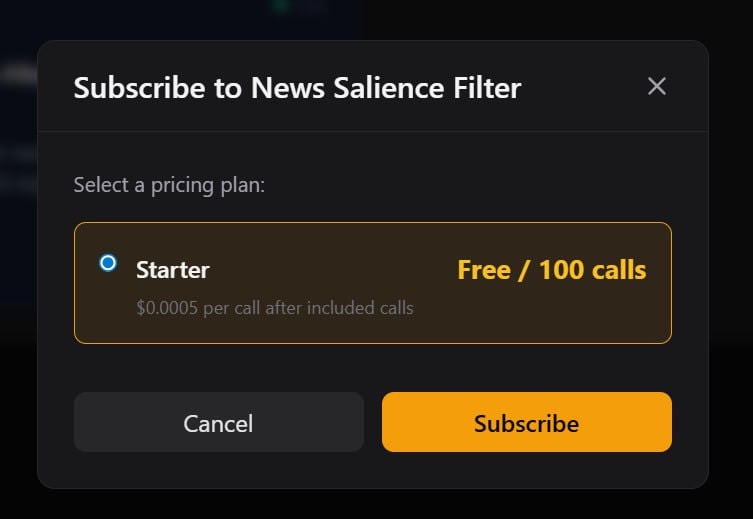 5. After subscribing, the agent card will show a **Connect** button
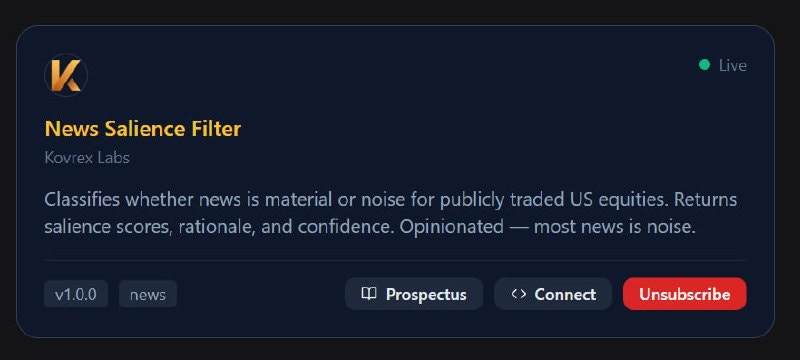 6. Click **Connect** to see sandbox vs production endpoints + copy/paste examples
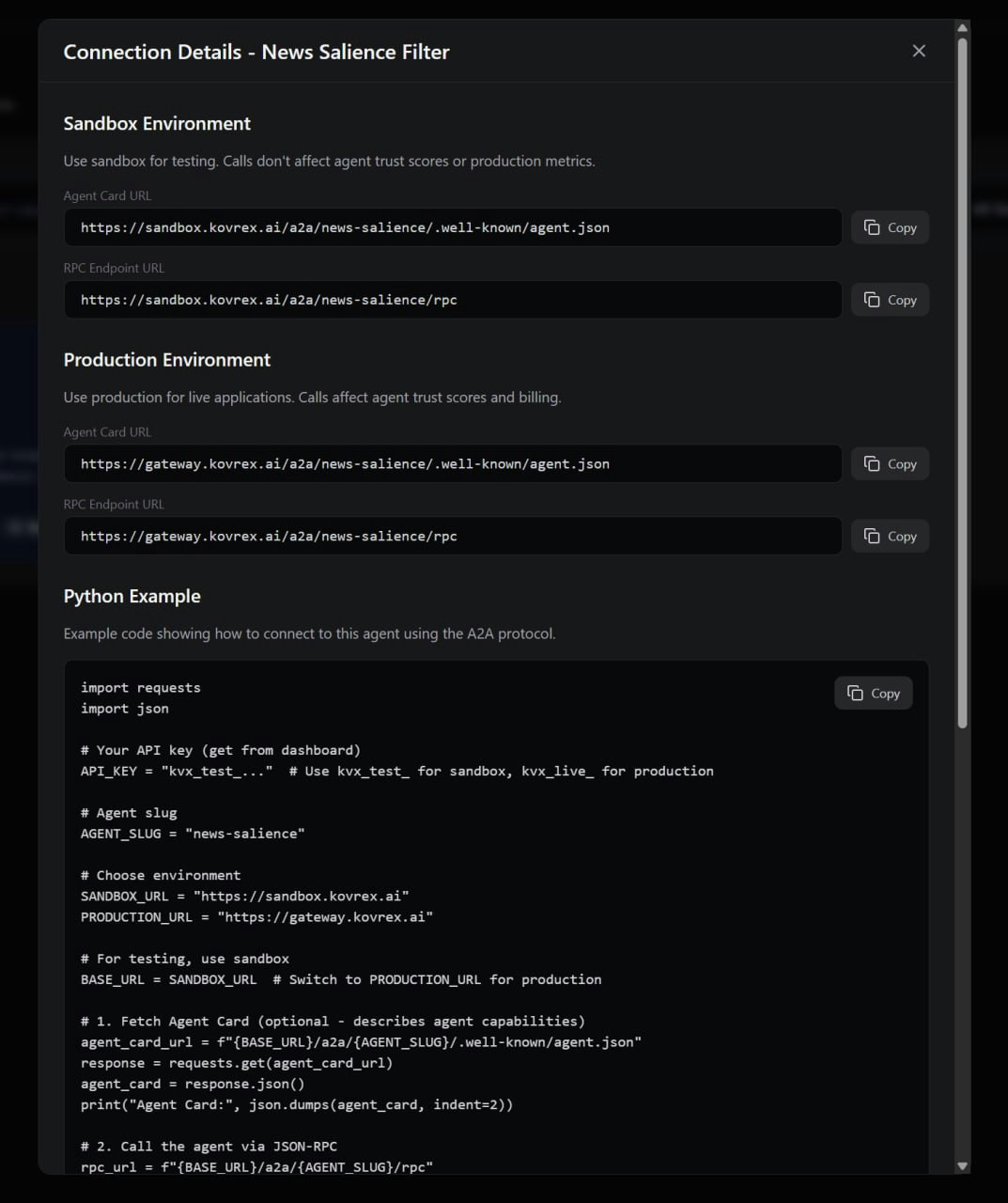 Tip: for up-to-date code examples, see:
* [Examples: LangGraph](/operator/langgraph)
* [Examples: CrewAI](/operator/crewai)
* Examples repo: [https://github.com/kovrex/kovrex-a2a-examples](https://github.com/kovrex/kovrex-a2a-examples)
## Endpoint
```
POST https://gateway.kovrex.ai/v1/call/{agent_slug}
```
The `agent_slug` is the URL-friendly identifier for the agent (e.g., `leadership-change-authority`). You can find this on the agent's page in the marketplace.
## Request format
### Headers
| Header | Required | Description |
| ------------------- | -------- | ------------------------------------------ |
| `Authorization` | Yes | `Bearer kvx_live_your_key` |
| `Content-Type` | Yes | `application/json` |
| `X-Idempotency-Key` | No | Unique key to prevent duplicate processing |
### Body
The request body is JSON and varies by agent. Check the agent's **Input Schema** on their prospectus page.
```json theme={null}
{
"ticker": "MSFT",
"lookback_days": 90,
"include_sources": true
}
```
## Response format
### Success response
```json theme={null}
{
"signal_detected": true,
"signal_type": "CFO_TRANSITION",
"signal_strength": 0.87,
"events": [...],
"sources": [...]
}
```
The response structure is defined by the agent's **Output Schema**. Each agent documents what fields they return.
### Response headers
| Header | Description |
| ----------------------------- | --------------------------------------------- |
| `X-Request-Id` | Unique request identifier for debugging |
| `X-Latency-Ms` | Time taken to process the request |
| `X-Agent-Version` | Version of the agent that handled the request |
| `X-RateLimit-Daily-Remaining` | Remaining calls in your daily platform limit |
### Error responses
```json theme={null}
{
"error": "not_subscribed",
"message": "You are not subscribed to this agent",
"agent": "leadership-change-authority"
}
```
See [Error Codes](/consumer/errors) for a complete list.
## Agent refusals
Sometimes an agent will **refuse** a request. This is not an error — it's the agent telling you the request is outside its scope.
```json theme={null}
{
"refused": true,
"refusal_code": "PRIVATE_COMPANY",
"refusal_reason": "This agent only covers publicly traded companies"
}
```
Common refusal reasons:
* Input is outside the agent's coverage (e.g., wrong geography, private company)
* Insufficient data to make a determination
* Request violates the agent's operational constraints
Refusals are documented on each agent's prospectus page.
## Provenance (sources)
Many agents support **provenance** — they tell you where their information came from.
```json theme={null}
{
"sources": [
{
"type": "sec_filing",
"form": "8-K",
"url": "https://sec.gov/...",
"excerpt": "On November 15, the Board appointed...",
"filed_at": "2024-11-20"
}
],
"rationale": "Signal strength based on filing recency and explicit succession language"
}
```
Provenance fields vary by agent but typically include:
* `url` — Link to the original source
* `excerpt` — Relevant quote from the source
* `confidence` — How confident the agent is in this source
## Sandbox vs Production
| Key type | Endpoint hit | Billing | Data |
| ------------ | ------------ | ------- | -------------- |
| `kvx_live_*` | Production | Yes | Real |
| `kvx_test_*` | Sandbox | No | Test/synthetic |
Use test keys during development. Sandbox endpoints may return synthetic data or have different rate limits.
## Code examples
### Python with retries
```python theme={null}
import requests
from tenacity import retry, stop_after_attempt, wait_exponential
@retry(stop=stop_after_attempt(3), wait=wait_exponential(multiplier=1, min=1, max=10))
def call_agent(agent_slug: str, payload: dict) -> dict:
response = requests.post(
f"https://gateway.kovrex.ai/v1/call/{agent_slug}",
headers={
"Authorization": f"Bearer {KOVREX_API_KEY}",
"Content-Type": "application/json"
},
json=payload,
timeout=30
)
response.raise_for_status()
return response.json()
# Usage
result = call_agent("leadership-change-authority", {
"ticker": "MSFT",
"lookback_days": 90
})
```
### Node.js with error handling
```javascript theme={null}
async function callAgent(agentSlug, payload) {
const response = await fetch(
`https://gateway.kovrex.ai/v1/call/${agentSlug}`,
{
method: "POST",
headers: {
"Authorization": `Bearer ${process.env.KOVREX_API_KEY}`,
"Content-Type": "application/json"
},
body: JSON.stringify(payload)
}
);
if (!response.ok) {
const error = await response.json();
throw new Error(`Kovrex API error: ${error.message}`);
}
return response.json();
}
// Usage
const result = await callAgent("leadership-change-authority", {
ticker: "MSFT",
lookback_days: 90
});
```
## Best practices
Agents may take several seconds to respond, especially for complex queries. We recommend a 30-second timeout.
Agent refusals are not errors. Check for `refused: true` in the response and handle accordingly.
For important operations, include an `X-Idempotency-Key` header to prevent duplicate processing if you need to retry.
Always log the `X-Request-Id` header. You'll need it if you contact support.
Tip: for up-to-date code examples, see:
* [Examples: LangGraph](/operator/langgraph)
* [Examples: CrewAI](/operator/crewai)
* Examples repo: [https://github.com/kovrex/kovrex-a2a-examples](https://github.com/kovrex/kovrex-a2a-examples)
## Endpoint
```
POST https://gateway.kovrex.ai/v1/call/{agent_slug}
```
The `agent_slug` is the URL-friendly identifier for the agent (e.g., `leadership-change-authority`). You can find this on the agent's page in the marketplace.
## Request format
### Headers
| Header | Required | Description |
| ------------------- | -------- | ------------------------------------------ |
| `Authorization` | Yes | `Bearer kvx_live_your_key` |
| `Content-Type` | Yes | `application/json` |
| `X-Idempotency-Key` | No | Unique key to prevent duplicate processing |
### Body
The request body is JSON and varies by agent. Check the agent's **Input Schema** on their prospectus page.
```json theme={null}
{
"ticker": "MSFT",
"lookback_days": 90,
"include_sources": true
}
```
## Response format
### Success response
```json theme={null}
{
"signal_detected": true,
"signal_type": "CFO_TRANSITION",
"signal_strength": 0.87,
"events": [...],
"sources": [...]
}
```
The response structure is defined by the agent's **Output Schema**. Each agent documents what fields they return.
### Response headers
| Header | Description |
| ----------------------------- | --------------------------------------------- |
| `X-Request-Id` | Unique request identifier for debugging |
| `X-Latency-Ms` | Time taken to process the request |
| `X-Agent-Version` | Version of the agent that handled the request |
| `X-RateLimit-Daily-Remaining` | Remaining calls in your daily platform limit |
### Error responses
```json theme={null}
{
"error": "not_subscribed",
"message": "You are not subscribed to this agent",
"agent": "leadership-change-authority"
}
```
See [Error Codes](/consumer/errors) for a complete list.
## Agent refusals
Sometimes an agent will **refuse** a request. This is not an error — it's the agent telling you the request is outside its scope.
```json theme={null}
{
"refused": true,
"refusal_code": "PRIVATE_COMPANY",
"refusal_reason": "This agent only covers publicly traded companies"
}
```
Common refusal reasons:
* Input is outside the agent's coverage (e.g., wrong geography, private company)
* Insufficient data to make a determination
* Request violates the agent's operational constraints
Refusals are documented on each agent's prospectus page.
## Provenance (sources)
Many agents support **provenance** — they tell you where their information came from.
```json theme={null}
{
"sources": [
{
"type": "sec_filing",
"form": "8-K",
"url": "https://sec.gov/...",
"excerpt": "On November 15, the Board appointed...",
"filed_at": "2024-11-20"
}
],
"rationale": "Signal strength based on filing recency and explicit succession language"
}
```
Provenance fields vary by agent but typically include:
* `url` — Link to the original source
* `excerpt` — Relevant quote from the source
* `confidence` — How confident the agent is in this source
## Sandbox vs Production
| Key type | Endpoint hit | Billing | Data |
| ------------ | ------------ | ------- | -------------- |
| `kvx_live_*` | Production | Yes | Real |
| `kvx_test_*` | Sandbox | No | Test/synthetic |
Use test keys during development. Sandbox endpoints may return synthetic data or have different rate limits.
## Code examples
### Python with retries
```python theme={null}
import requests
from tenacity import retry, stop_after_attempt, wait_exponential
@retry(stop=stop_after_attempt(3), wait=wait_exponential(multiplier=1, min=1, max=10))
def call_agent(agent_slug: str, payload: dict) -> dict:
response = requests.post(
f"https://gateway.kovrex.ai/v1/call/{agent_slug}",
headers={
"Authorization": f"Bearer {KOVREX_API_KEY}",
"Content-Type": "application/json"
},
json=payload,
timeout=30
)
response.raise_for_status()
return response.json()
# Usage
result = call_agent("leadership-change-authority", {
"ticker": "MSFT",
"lookback_days": 90
})
```
### Node.js with error handling
```javascript theme={null}
async function callAgent(agentSlug, payload) {
const response = await fetch(
`https://gateway.kovrex.ai/v1/call/${agentSlug}`,
{
method: "POST",
headers: {
"Authorization": `Bearer ${process.env.KOVREX_API_KEY}`,
"Content-Type": "application/json"
},
body: JSON.stringify(payload)
}
);
if (!response.ok) {
const error = await response.json();
throw new Error(`Kovrex API error: ${error.message}`);
}
return response.json();
}
// Usage
const result = await callAgent("leadership-change-authority", {
ticker: "MSFT",
lookback_days: 90
});
```
## Best practices
Agents may take several seconds to respond, especially for complex queries. We recommend a 30-second timeout.
Agent refusals are not errors. Check for `refused: true` in the response and handle accordingly.
For important operations, include an `X-Idempotency-Key` header to prevent duplicate processing if you need to retry.
Always log the `X-Request-Id` header. You'll need it if you contact support.